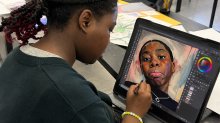
Facilitating Students’ Artistic Expression With Digital Self-Portraits
This project guides high school students to explore artists’ use of texture, color, and abstract forms.
Your content has been saved!
Go to My Saved Content.As an art teacher, I often perceive that many students find creating a self-portrait daunting. A new approach to self-portraiture, combining digital technology and student-led research, can shape creative inquiry and help to explore identity. Traditional self-portrait assignments usually emphasize realism. In my experience, this can intimidate students, causing them to worry about how accurately they can draw their own features. I wanted my students to approach self-portraiture as an opportunity to communicate who they are, instead of an exercise in re-creating what they look like.
Their goal was to create an original digital self-portrait that maintained recognizable facial features while incorporating abstract artistic elements that communicated aspects of their identity. I implemented this project with 11th- and 12th-grade students over approximately three and a half weeks. In the multistep process, students explored contemporary artists, experimented with digital media, and used creative decision-making to transform photographs into meaningful works of art.
Artist Study
We started with a three-day artist study; students analyzed artists who do portraiture in unique ways through abstraction, symbolism, color, and composition. I used a combination of my subscription to FLEX Curriculum web-based resources and self-guided internet research to introduce students to artists whose work challenged traditional ideas about portraiture. To support students who needed a starting point, I curated a collection of contemporary artists (such as Kyle Foster, Jean-Michel Basquiat, Kadir Nelson, and Derrick Adams) whose work demonstrated innovative approaches to self-representation.
Students could either select an artist from my collection or conduct additional research to find an artist whose style resonated with them. Their contemporary artist research was a critical component of the project.
These are some of the the guiding questions I had students consider as they completed their artist studies:
- What do you notice first about the author’s work?
- How does the artist use color, line, shape, and texture to create a particular mood or feeling?
- How does the artist represent facial features, and what makes their approach unique?
Rather than being encouraged to copy another artist’s work, it was important for students to understand how to make visual choices. I asked them to examine how the artist they researched communicated their personal stories, ideas, and experiences through their visual choices. Students identified specific techniques, color palettes, compositional strategies, and stylistic elements that they might adapt within their own work. The goal was for them to use their observations as inspiration, experiment with different techniques, and ultimately create self-portraits that reflected their own identities, experiences, and creative voices.
Photography and Drafting
Following the artist study and research phase, students spent approximately one week photographing each other or themselves (selfies); I made it clear that they had to use a recent picture of themselves.
To formulate a conceptual framework, students generated concepts, brainstormed symbolic imagery, and created preliminary drafts while photographing themselves. We created an identity-centered word-web that considered personal interests, family influences, cultural connections, future goals, and life experiences as potential sources of inspiration. Sketching and planning at the end of the week helped students think intentionally about how color, texture, symbols, and abstract forms could work together within a single composition.
Digital Creation
The final two weeks were dedicated to digital production. Every student had access to a laptop equipped with Adobe Photoshop, Adobe Fresco, Procreate, Canva, and Krita. I provided multiple software options so that my students could choose tools that aligned with their comfort level and creative goals. Some students preferred Photoshop’s editing capabilities, while others worked more comfortably in drawing-based programs such as Fresco or Procreate. A prerequisite for the class was that each student had to have taken Introduction to Computer Programs the year prior.
One of my students chose contemporary artist Kyle Foster as inspiration. After studying Foster’s expressive portrait work, the student experimented with a personal photograph and various digital tools to explore some of the qualities that made Foster’s work compelling. The first attempts weren’t easy and required revision, adjustment, and persistence. He even changed digital programs midway. Through multiple drafts, he refined his portrait by experimenting with color, layering, and abstraction while maintaining his recognizable facial features. Eventually, he looked at his portrait and said, “I really like studying Foster. I just didn’t think I could re-create his style on the computer using my own picture as a reference. Ms. A., it really came out good!”
Experiences like this demonstrated why artist study was so valuable. My students drew inspiration from practicing artists and learned how to develop their own visual language. The process helped them understand that creativity doesn’t come from copying an image. Students can adapt ideas and techniques to communicate something personal.
Critique and Feedback
I found that providing ongoing feedback was essential throughout the project. My class environment is set up similarly to a college art class: stand-alone seating, high and low independent workstations, and easels. During every period, I circulated around the room, checked student progress, answered technical questions, and held informal one-on-one conferences. Sometimes, students came to me for assistance; other times, I met them at their workstations to discuss artistic decisions and use problem-solving to address challenges. These conversations are valuable opportunities to provide immediate support and assess progress while encouraging students to take ownership of their creative process.
Because students could take their laptops home, I also offered a three-hour Zoom support session on Saturdays. Students could sign up (by Friday afternoon) for 10-minute one-on-one slots with me; no more than 20 minutes each session. They were able to jump on, share their screen, receive feedback from me, troubleshoot software issues, and discuss ideas before returning to class the following week. These optional sessions proved especially beneficial for students who wanted additional guidance or were experimenting with more complex digital techniques.
My assessment of the self-portraits evaluated both the technical execution of the artwork and students’ ability to connect their artistic choices to the concepts they identified during the planning process.
How I’d Revise the Project
If I’m able to teach this project again, I’ll incorporate more structured mini-lessons focused on digital-art tools, layering techniques, color blending, and abstraction. I’ll also include opportunities for peer critiques and revision, so that students have more time to reflect on feedback and refine their work before submission. A broader range of example artworks that demonstrate different approaches to self-portraiture could also be a helpful adjustment. Doing so would help students recognize that there’s no single correct interpretation of the assignment and that successful work can emerge through a variety of artistic styles and processes.
The project reinforced the importance of balancing technical instruction with creative freedom, allowing students to take risks while building confidence with digital media. I believe that technology can support artistic thinking by providing new creative possibilities. In this project, the computer became another kind of studio, one where students could imagine, create, revise, and find their digital voice.