
7 Ways Tech Can Make Learning More Visible to Families
From weekly recaps to shared portfolios, simple digital routines can give families a clearer picture of what’s happening in the classroom.
Your content has been saved!
Go to My Saved Content.Keeping families in the loop can easily become one more thing on a teacher’s already long to-do list. Notes get lost, messages pile up, and before long, most communication home happens only when something goes wrong.
Digital tools make it easier to communicate consistently with families—and to share positive updates about students’ learning, not just problems. But even with more ways to hear from schools and teachers, families may still wonder what their students are actually learning, what technologies they’re using, and what work they’re producing. Giving families a clearer picture of what’s happening in the classroom can lead to better conversations at home and help them feel more connected to their students’ learning, says Dyane Smokorowski, coordinator of digital technology at Wichita Public Schools.
When a student comes home and someone asks, “What did you do at school today?” the conversation can move beyond vague answers and center instead on the endangered animal a student is researching in biology class, a significant court case they’re studying in history class, or a moving piece of poetry they’ve been discussing in English.
“It starts the conversation up with a better outcome of learning with families,” says Smokorowski. “And it builds that trust between schools and home so that there’s this idea that we’re helping our entire community grow as learners, versus this is a place I go drop a child off and pick them up.”
Here are seven digital practices that can give families a better window into what—and how—their students are learning.
Put Students in Charge of Updates
When she was a high school English teacher, Chanea Bond took some of the burden of family communication off herself by having students write professional emails to their home adults—a practice that also asks students to reflect on their own learning.
Bond starts by teaching students the basics of a professional email: a subject line, greeting, body, closing, and signature. For their first email home, students use a template to share five things: their current grade, missing assignments, a plan to maintain or improve their grade, their number of absences, and one achievement from the week they’re proud of.
As the year progresses, Bond changes what students report on. In April, for example, she asks them to update families on their final research project, including the topic, why they chose it, their progress finding sources, and how they plan to present their work.
“Not only does this practice keep parents informed on long-term assignments,” writes Bond, “but the email requires students to synthesize their academic work and name places of discomfort or misunderstanding.”
Narrate Student Work
At Wichita Public Schools, teachers use Seesaw—an online hub for instructional tools and digital portfolios—to give families a snapshot of what students create. Alongside a quick photo of a project or assignment, students or teachers can record a voice note or short video explaining the thinking behind the work, says Smokorowski.
When Smokorowski’s fifth-grade class read Because of Winn-Dixie, for example, she asked students to explain how characters responded to major events and challenges and how those choices moved the story forward. Students could represent their thinking however they chose, using materials like markers, crayons, paper, glue, and Popsicle sticks.
One student laid Popsicle sticks side by side, like boards on a bridge or steps along a path, with each stick representing a challenge the character encountered, a response, or a consequence. Smokorowski recorded a short conversation with the student in Seesaw, asking questions like “What happened here?” “How did the character respond?” and “What happened because of that choice?”
Pairing the creation with the student’s explanation lets families see not just the finished product but the thinking behind it. Once work is uploaded to Seesaw, families receive a notification and can view it, leave feedback, or ask questions. “It’s this very powerful way of deepening family conversations that we haven’t had previously,” writes Smokorowski.
Create a Weekly Visual Recap
Early in her teaching career, Wendy Turner learned that families stayed more engaged when they had a regular sense of what was happening in class. “You’ve got to let families know what you’re doing every week,” she says. She started with a paper newsletter, moved to an emailed PDF, and now uses the digital platform ClassDojo—which allows teachers to showcase students’ work and communicate with families—to share a weekly visual recap.
Every Friday, Turner posts a single Google Slides slide to ClassDojo—her “Team Turner Recap”—with updates on student learning, important dates, and reminders. The slide also links to a Google Photos album, where she aims to share at least 100 pictures a week so families “feel like they’re in the classroom.” The pictures give families glimpses of what students have been up to and can help spark conversations by jogging a child’s memory or giving adults something specific to ask about, like, “I saw you were learning about the solar system this week—what surprised you?”
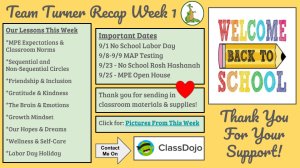
Turner also uses ClassDojo to handle other routine family communication:
- Automate calendar reminders: Before an event like picture day, Turner creates a calendar event in ClassDojo, which automatically reminds families five days before the event, again on the day of, and one hour beforehand.
- Distribute family surveys: Early in the school year, Turner uses a Google Form to gather practical information, such as how each student gets home.
- Chat privately with families: Turner can send individual updates about students’ academic progress or behavior and include multiple caregivers in the same conversation when needed. “Even if I have parents who are split between houses,” she says, “I can bring all those people into a conversation.”
Give Families Better Questions to Ask
Families may want to talk with students about what they’re learning but struggle to get beyond broad questions like, “How was school?” or “What did you eat for lunch?” Teachers can help by including a few specific conversation prompts in their regular updates home.
In a weekly newsletter sent through ParentSquare, elementary school teacher April Archer shares what students worked on the previous week, what’s coming up, class vocabulary, daily math lessons, and the main topics they’re studying across subjects. She ends each newsletter with questions families can ask at home. For example, after a lesson on area models, she might include, “Ask your student to show you how to solve three-digit-by-three-digit multiplication using the area model.” The prompt creates a “great family moment for my students to do some teaching,” writes Archer.
High school English teacher Marcus Luther takes a similar approach, adding suggested questions to the updates he sends home—often with enough context to make the prompts feel useful. After his class reviews feedback on a recent essay, for example, he might suggest, “Ask your student about the feedback they received on their essay and one thing they want to improve for next time.” The goal, he says, is to “give families and home adults something to build purposeful conversations with.”
Show School Life on Social Media
At Pompton Lakes High School in New Jersey, principal Scott Wisniewski’s Instagram account gives families a regular glimpse into the classrooms, programs, and activities that define the school community.
Wisniewski spends 15 to 20 minutes each day crafting a post about the “best part” of his day—which might mean celebrating a field hockey win, recognizing a student accepted into a prestigious program, highlighting math teachers, or simply sharing a memorable classroom or student interaction. Parents, he writes, “appreciate the daily updates, which give them a unique glimpse into our school’s daily happenings.”
To make the daily routine manageable, Wisniewski doesn’t plan every post in advance. Some days he knows what he wants to feature; on others, he lets the school day supply the subject. He also rotates among departments, sports, and groups of students so the feed reflects the broader school community. At the end of the year, he turns his daily posts into a video that lets students and staff look back on the year.
Rupert Elementary School principal Matthew Moyer recommends a similar, streamlined approach: Focus on moments that families care about most—students learning, growing, participating in school life—and keep captions brief by explaining what’s happening and why it matters. Schools should also establish clear policies for sharing student photos; Moyer’s school, for example, uses an opt-out policy. “Parents and community members are already scrolling through their phones multiple times a day,” writes Moyer. “By showing up where they already are, schools can become a consistent, trusted voice in their news feeds.”
Social media can work at the classroom level, too. Middle school teacher Cristie Watson runs a private Instagram account accessible to only her students’ families. In less than a minute, she can post photos or videos highlighting her students’ creativity and hard work—from building cardboard ziggurats to meeting in book clubs.
One dad told Watson that he particularly appreciated seeing how students learn—whether as a whole class, in small groups, at desks, or stretched out on the floor. “Through social media, families can experience what I see—their children’s enthusiasm and success,” she writes.
Explain How—and Why—Students Are Using Tech
Families may know their students are using laptops, AI, apps, or other digital tools in school without having much sense of what they’re actually doing with them. To help schools make that use more transparent, Andrew Marcinek, director of information technology at Seattle Preparatory School, created a sample family-facing technology overview that schools can adapt and send home. The template explains where technology fits into a typical school day, why certain tools are used, and what that use looks like in practice.
Under a section titled “What a normal day looks like,” for example, the brief explains that students might spend 10 minutes using a laptop to capture lab data in science class or 15 minutes drafting an essay for English class. The goal, says Marcinek, is to give families a concrete sense of how technology supports learning—rather than leaving them to imagine students spending the entire day on screens.
Schools can share this context on a website, in back-to-school materials, or through regular newsletters and family communication apps. Teachers can offer the same transparency by periodically highlighting how technology is used in their classrooms—whether students are recording podcasts, animating fictional characters, or participating in an online government simulation.
Make Communication Sustainable
Digital tools should ease the work of family communication—not add another time burden. Teachers and technology specialists offered these tips for keeping it manageable.
- Keep it simple: Digital platforms like Seesaw and ClassDojo are vehicles “for capturing the thinking,” says Smokorowski. Capturing students’ work should take less than two minutes, since most of the work––the drawing, writing, investigating, discussing, collaborating, and creating––happens beforehand.
- Reuse your templates: Once you have a format for a newsletter, message, or recap, keep it. Turner spends about 30 minutes preparing each week’s Team Turner Recap by copying the previous week’s template and updating the dates, photo link, upcoming events, and learning highlights.
- Be selective: Not every project, assignment, or classroom moment needs to be documented. Prioritize moments when seeing or hearing a student’s work or thinking “adds something meaningful” to a family’s understanding of what their child is doing and learning at school, says Smokorowski.